How to Transfer Money on Skype via PayPal on iPhone and Android
Step #1: On your smartphone, launch Skype app and tap on Find or swipe right.Must Read:How to delete icloud account without password ?
This will open up the listed add-ins.
Step #2: Now tap on Send Money, which is one of the add-ins on your Skype.
Step #3: Next, choose the country you live in and then select the country your contact lives in (contact means the person to whom you want to send money).Sponsor Ads:
Gihosoft Free iPhone Data Recovery is a professional iPhone Data Recovery software to get back all your lost text message, photo, video, call history, note, contact and more from iPhone/iPad/iPod Touch. It offers a full solution to recover your lost data in different tough situations. Besides recovering data directly from iPhone, iPad and iPod touch, it also allows you to recover data from iCloud and iTunes backup files.
iPhone backup unlocker:Recover iTunes Backup Password.
iPhone backup extractor free:The best iPhone Backup Extractor software to extract photos, text messages, contacts, voice memos, note, WhatsApp, Viber and etc from iPhone/iPad backup.
Youtube/Tumblr video downloader - Download Youtube/Tumblr video lets you convert and download Youtube/Tumblr to MP4 and MP3 for Free!
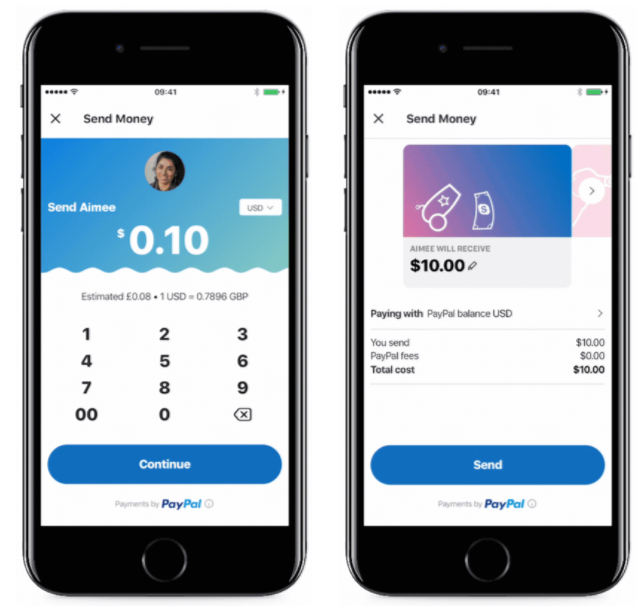
Step #4: Then you need to enter the amount you want to send and press Next.
Here, you will be asked to sing into your PayPal account; you are also required to link your PayPal account to Microsoft one.
Step #5: Once you establish the connection, press the Send button to complete the transfer process.
Finally, come back to chat screen to confirm the transfer status.
When you receive or a person sends you money in Skype, your chat will show a Money Transfer card. Receiver needs to tap on the card and s/he will be landed on a secured payment website. On this website, receiver has to tap on Collect and then the amount will be transferred to his/her account.
If you don’t want to use app, you can also use Skype client and transfer the money; however, this will involve a few extra steps. Similarly, when a receiver gets the money from a person using Skype client, receiver will receive a message with a link on chat screen. Upon clicking the link, receiver will be landed on a website from where s/he can tap on Collect and get the amount.


No comments:
Post a Comment